Optical Character Recognition (OCR)
OCR converts scanned or uploaded PDF files into searchable text, making it easy to find information within your documents.
Prerequisites
To use OCR, you need:
- OCR enabled on your account – Contact AffableBPM Corporation to activate OCR and purchase page blocks
- AffableBPM Interface Software installed (for scanning) – See Installing the Interface Software
How OCR Works
Once OCR is enabled for your organization and managers activate it for specific workflows, the system automatically processes PDF documents when they're scanned or uploaded:
- Only PDF files use your page block quota
- Smart processing – If a PDF is already searchable, it won't consume any page blocks
How to Search OCRed Documents
-
Click the Records sidebar tab
-
From the Workflows menu, find and click your assigned workflow
-
In the Records section, click View or Edit
-
Wait for the record listing to appear
-
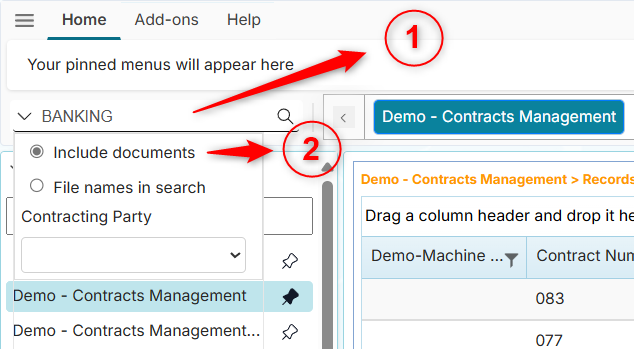
Expand the search box and check the "Include documents" checkbox
-
Enter your search term and press Enter or click the search icon
Understanding Search Results
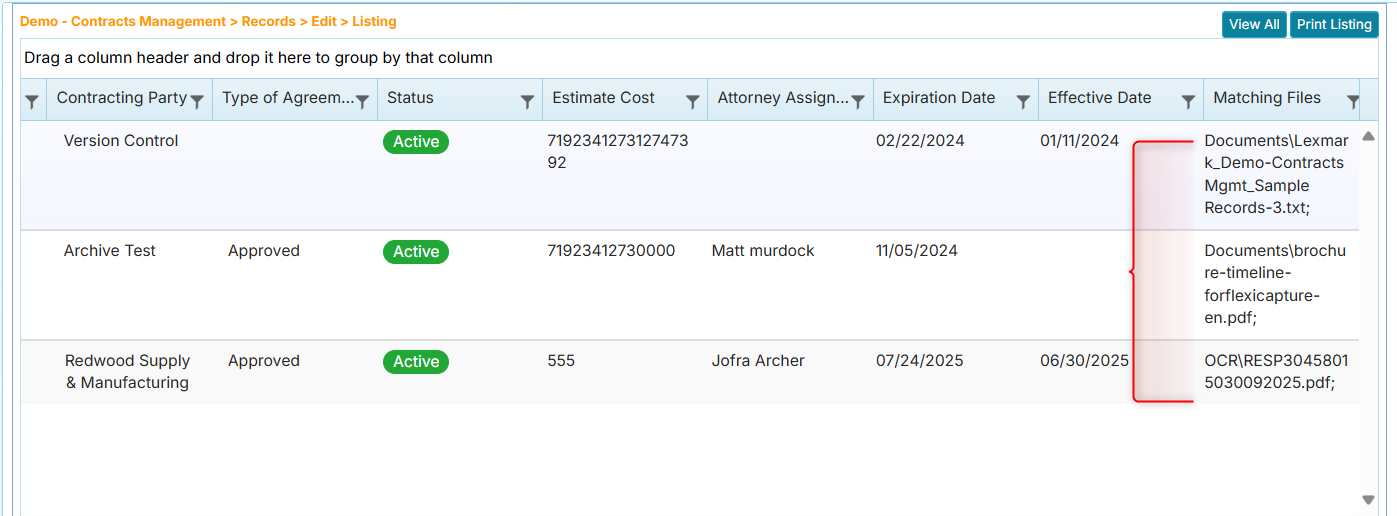
Matching documents appear in the Matching Files column:
- You'll see the folder and file name containing your search term
- Multiple matches are shown as a semicolon-separated list