Workflow Settings
The Workflow setting menu allows you to manage the following sections:
- Tickler/Date Notify
- Routing
- E-Signature
- Auto Number Fields
- Dropdown Fields
- Dashboard Reports
- OCR
- Public Access
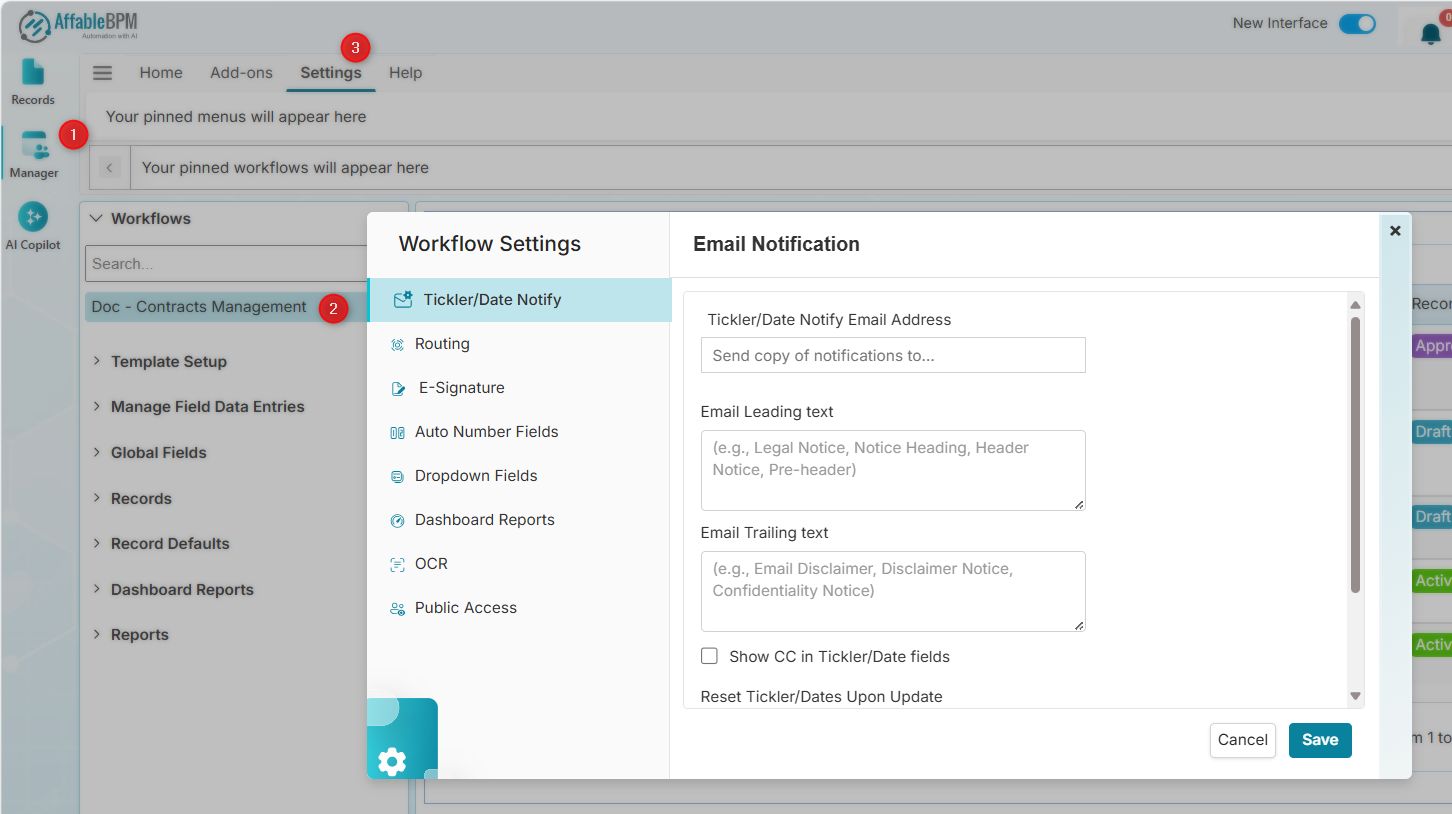
Tickler/Date Notify
- Tickler/Date Notify Email Address - Email address to receive a copy of all tickler notifications sent nightly.
- Email Leading Text - Text that appears at the beginning of the e-mail notification.
- Email Trailer Text - Text that appears at the end of the e-mail notification.
- Show CC in Tickler/Date Fields - Enables displaying CC fields for tickler-type fields in form entries.
- Reset Tickler/Dates Upon Update - Resets sending of tickler notifications.
- Send Alerts X Months in Advance - Sends notification a specified number of months before the notification date. You can override this on individual tickler records.
Routing
- Routing Email Address - Email address to receive a copy of all routing emails.
- Email Leading Text - Text that appears at the beginning of the e-mail notification.
- Email Trailer Text - Text that appears at the end of the e-mail notification.
- Route Mode - Blocks or continues routing when a recipient disapproves.
- Send Routing Reminders Every (nth) Days - Sends email reminders after the specified number of days.
- Show Comment Format Controls - Enables displaying comment formatting controls in routing.
- Routing Email Daily Digest - Sends daily confirmation emails for sent digests. Recommended for system administrators monitoring email operations.
E-Signature
- Routing Email Address - Email address to receive a copy of all signature emails.
- Email Leading Text - Text that appears at the beginning of the e-mail notification.
- Email Trailer Text - Text that appears at the end of the e-mail notification.
Auto Number Fields
-
Set Auto Number Format - Use formatting characters to generate custom identifiers for the Auto Number field. For example,
XXX-{%YY%}-{%###%}producesXXX-24-001.Allowed formatting characters:
YY- two-digit yearYYYY- four-digit yearMM- two-digit monthDD- two-digit dayGGG- Gregorian day (day of year, 001-366)#- auto-incrementing sequential number (use multiple # symbols to set zero-padding, e.g.,###= 001, 002, 003;#####= 00001, 00002, 00003)- Static text - any text outside the
{%%}delimiters (e.g., INV-, DRAFT-)
Dropdown Fields
- Allow Non-Managers to Add New Items - Checking this allows non-managers to add new items in dropdown fields.
Dashboard Reports
- Show Dashboard Menu on View/Edit - Checking this lists dashboard report items on the page.
OCR
-
Enable OCR - Checking this converts newly uploaded scanned PDF documents into searchable text. The Process all PDF documents in this workflow button OCRs all unprocessed scanned PDFs into searchable versions.
infoThis option only appears if OCR is enabled at the organization level.
Public Access
-
Enable Unrestricted Workflow Access - Checking this generates a URL to allow public access to records.
-
Allow File Publishing - Checking this generates a URL to allow public access to all published documents.
dangerEnable these options only for non-sensitive information you want to share publicly.